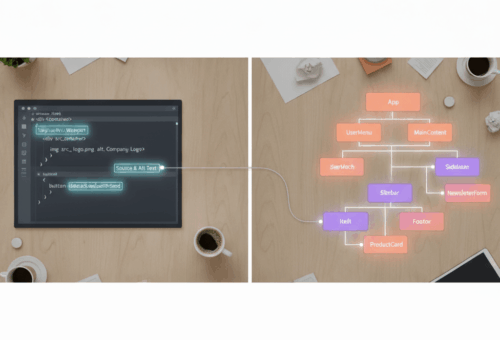
Short version for the impatient: partial prerendering isn’t an experimental flag any more, it’s the default behaviour of the App Router once you turn on cacheComponents, and the mental model flipped from “mark the dynamic bits” to “mark the cached bits.” If you learned PPR in the Next 15 era like I did, you have to unlearn a chunk of it.
I found this out the annoying way. Upgraded a client project, deleted experimental.ppr because the build told me to, and then spent an afternoon wondering why a dashboard that used to render instantly was now waiting on a database call before it sent a single byte.
The flag didn’t move. The default inverted.
What actually changed between Next 15 and Next 16
In Next 15, partial prerendering was opt-in twice over. You set the flag globally and then marked individual routes:
// next.config.js  (Next 15)
module.exports = {
  experimental: { ppr: 'incremental' },
}
// app/dashboard/page.jsx  (Next 15)
export const experimental_ppr = true
Both of those are gone. In Next 16 you get one switch:
// next.config.ts
import type { NextConfig } from 'next'

const nextConfig: NextConfig = {
  cacheComponents: true,
}

export default nextConfig
The cacheComponents docs put it plainly: data fetching is dynamic by default, and you choose what to cache at the page, component, or function level. That single sentence is the whole migration. Under the old model, a page was static until you did something dynamic in it. Under the new one, a page is dynamic until you say use cache.
That’s why my dashboard got slower. It had never had an explicit cache directive anywhere, because it never needed one. The old defaults were doing the work invisibly.
The static shell is the thing worth understanding
Strip away the config and the idea is simple. Next prerenders an HTML shell it can serve immediately, then streams the dynamic parts in as they resolve. One route, two rendering modes, no route-level either/or.
The practical consequence: your Suspense boundaries stopped being a loading-spinner nicety and became the seam where the shell ends and the stream begins. Everything outside a boundary has to be resolvable at build time or the shell can’t be produced.
// app/dashboard/page.jsx
import { Suspense } from 'react'

async function Nav() {
  'use cache'
  const links = await getNavLinks()
  return <nav>{/* ... */}</nav>
}

async function Revenue() {
  const rows = await db.revenue.forUser(await getUserId())
  return <Chart data={rows} />
}

export default function Page() {
  return (
    <>
      <Nav />
      <Suspense fallback={<ChartSkeleton />}>
        <Revenue />
      </Suspense>
    </>
  )
}
Nav goes in the shell. Revenue streams. I’d been treating Suspense as a UX decision for years, and it turned out I’d been making a caching decision the whole time without knowing it. I wrote a whole post on the loading states I stopped writing back when I thought this was purely a rendering concern. It isn’t.
use cache is per-function, and that’s the actual upgrade
Here’s the part I like. use cache isn’t a route setting. You can put it on a page, a component, or a plain async function:
async function getPricingTiers() {
  'use cache'
  const res = await fetch('https://api.example.com/tiers')
  return res.json()
}
Anything that calls getPricingTiers() gets the cached result, wherever it lives. Combine it with cacheLife for duration and cacheTag for targeted invalidation, and you can cache one expensive query while leaving the rest of the page fully dynamic.
The old model gave you route segment config, which meant the least cacheable thing on a page determined the behaviour of everything on it. I had routes where a single user-specific badge in the header dragged an otherwise static marketing page into full dynamic rendering. That specific frustration is what this release fixes.
The migration gotcha nobody warned me about
Cache Components requires the Node.js runtime. If you have export const runtime = 'edge' anywhere, it has to go. The migration guide covers it, and I’d read that guide, and I still missed it because the export was sitting in a middleware-adjacent route I hadn’t touched in a year.
The second one is stranger and I’m still adjusting. With cacheComponents on, Next uses React’s Activity component to keep recently visited routes mounted in a hidden state instead of unmounting them. Navigate away, navigate back, your form inputs and expanded sections are still there.
Mostly that’s lovely. It also means a dropdown that assumed it would be destroyed on navigation now isn’t. I had a modal that closed itself on unmount. It stopped closing itself. Took me twenty minutes to work out that nothing was broken, the component just wasn’t dying any more.
Effects are cleaned up when a route is hidden and recreated when it comes back, so subscriptions behave. It’s the render-once-on-mount assumptions that break.
Should you turn it on?
If you’re on Next 16 and your app has pages that mix genuinely static chrome with per-user data, yes, and the win is real. Time to first byte on that dashboard went from waiting-on-Postgres to immediate once I’d marked the shell properly.
If your app is basically all dynamic, an admin panel behind auth where nothing is cacheable, you’ll do the migration work and get very little back. I’d skip it and revisit later.
And if you’re mid-migration from Pages Router, do that first. Doing both at once means every problem has two possible causes, which is a bad way to spend a week. I’ve made that mistake on someone else’s dime and I’d rather not do it again.
What to do this week
Turn on cacheComponents in a branch, build, and read the errors. Next is fairly good at telling you which component broke the prerender and why, and the error list is a free audit of where your implicit caching assumptions were living.
Then pick one route and get its shell right before you touch anything else. Trying to fix twelve routes simultaneously is how you end up reverting the whole thing.
I do a fair amount of this kind of framework-upgrade archaeology on client projects, and it’s usually the invisible defaults that cost the time, not the documented breaking changes. More of that sort of work is on my portfolio, if you’re curious what it looks like at scale.